ramo /ˈʁɐ̃.mu/ Portuguese for “branch”
Branch out without the fear.
Ramo is a Git client made for the Mac and for people who code on their own. Undo any mistake, merge by dragging, and resolve conflicts without leaving the window.
Free for 14 days, then €24 once. No subscription, no account to try it.
Descarregar para Mac

Features Funcionalidades
Where Ramo goes further.
Resolve conflicts in one window
Yours, Result and Theirs side by side. Edit by hand. No second app.
Compare image conflicts
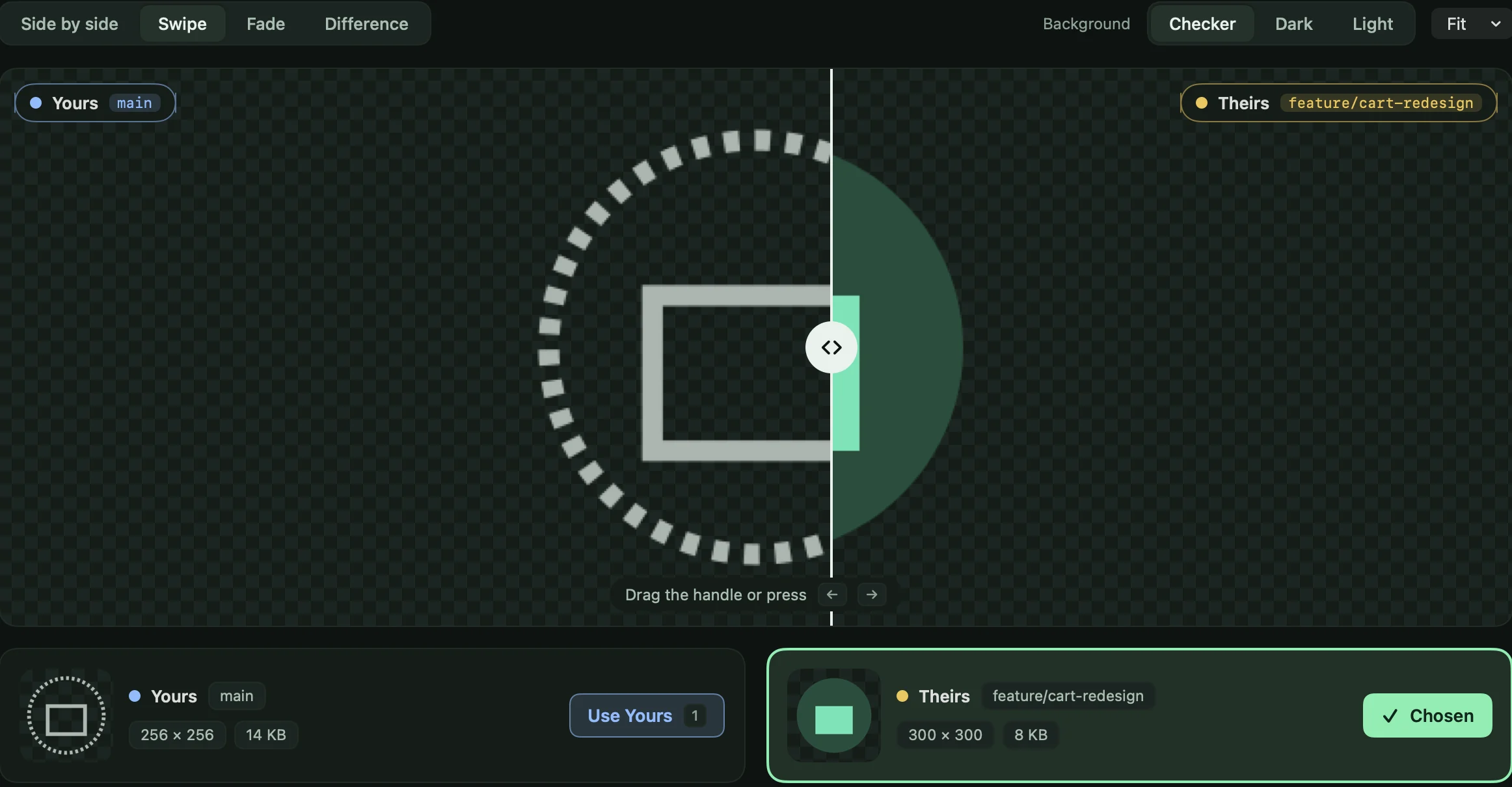
Side by side, swipe, fade or difference, then pick one or keep both.
Undo that remembers
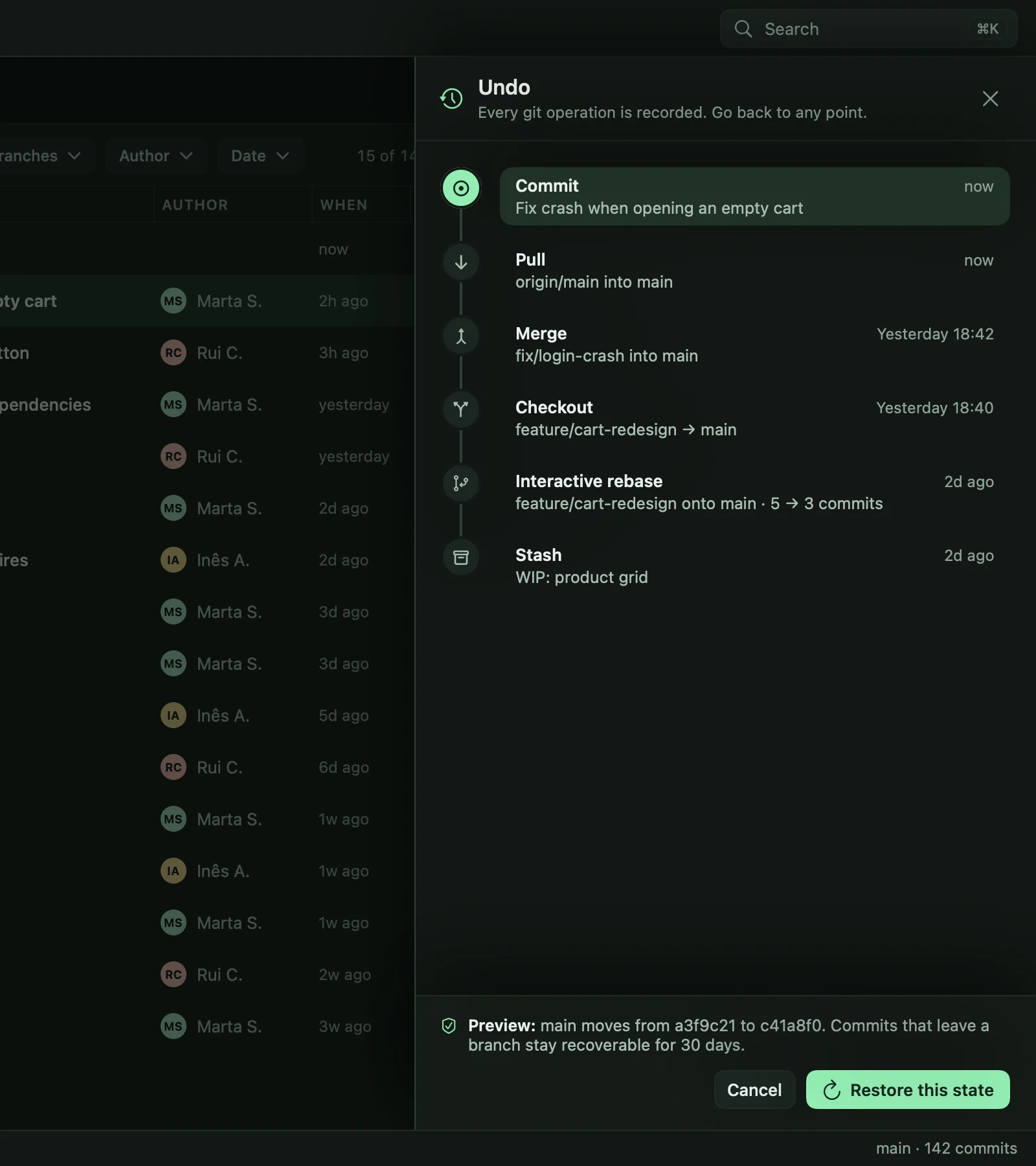
A timeline of every operation. Preview, then restore.
Drag to merge or rebase
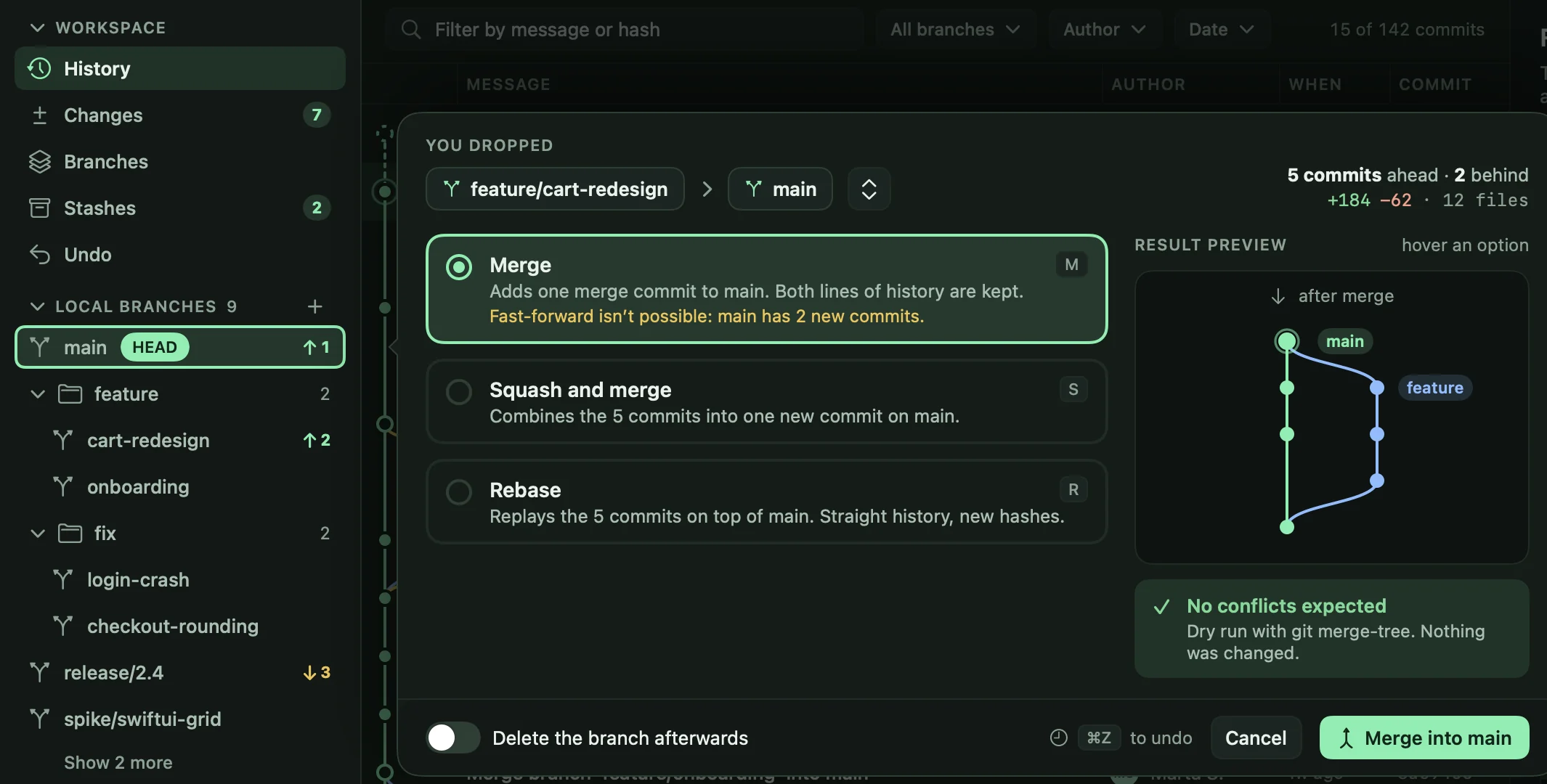
See the result and any conflicts before anything changes.
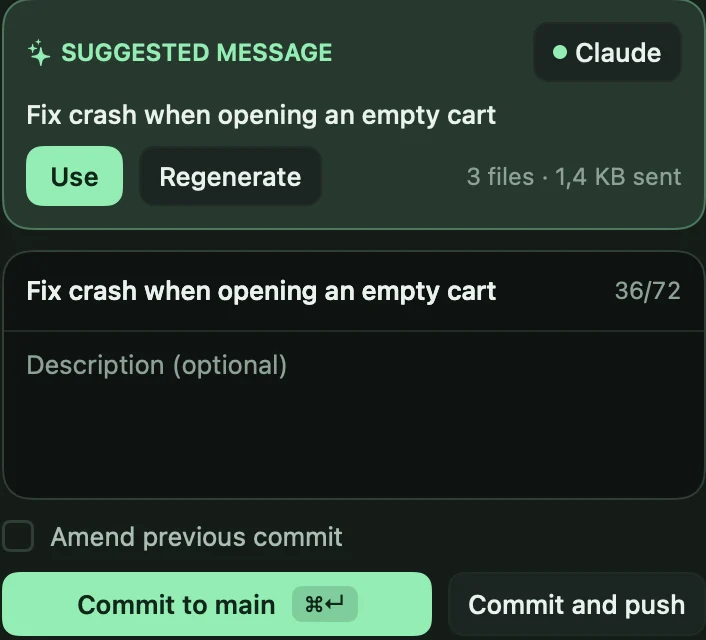
AI from your own assistant
Optional. You approve what is sent.
Stash in two clicks
Pick files in Changes and stash them.
⌘K palette
Every action behind one shortcut.
Resolve conflicts Resolver conflitos
Conflicts, solved in one window.
No second app, no temp files. Ramo has a conflict resolver built in, made for how you really fix conflicts: read, pick, edit, move on.
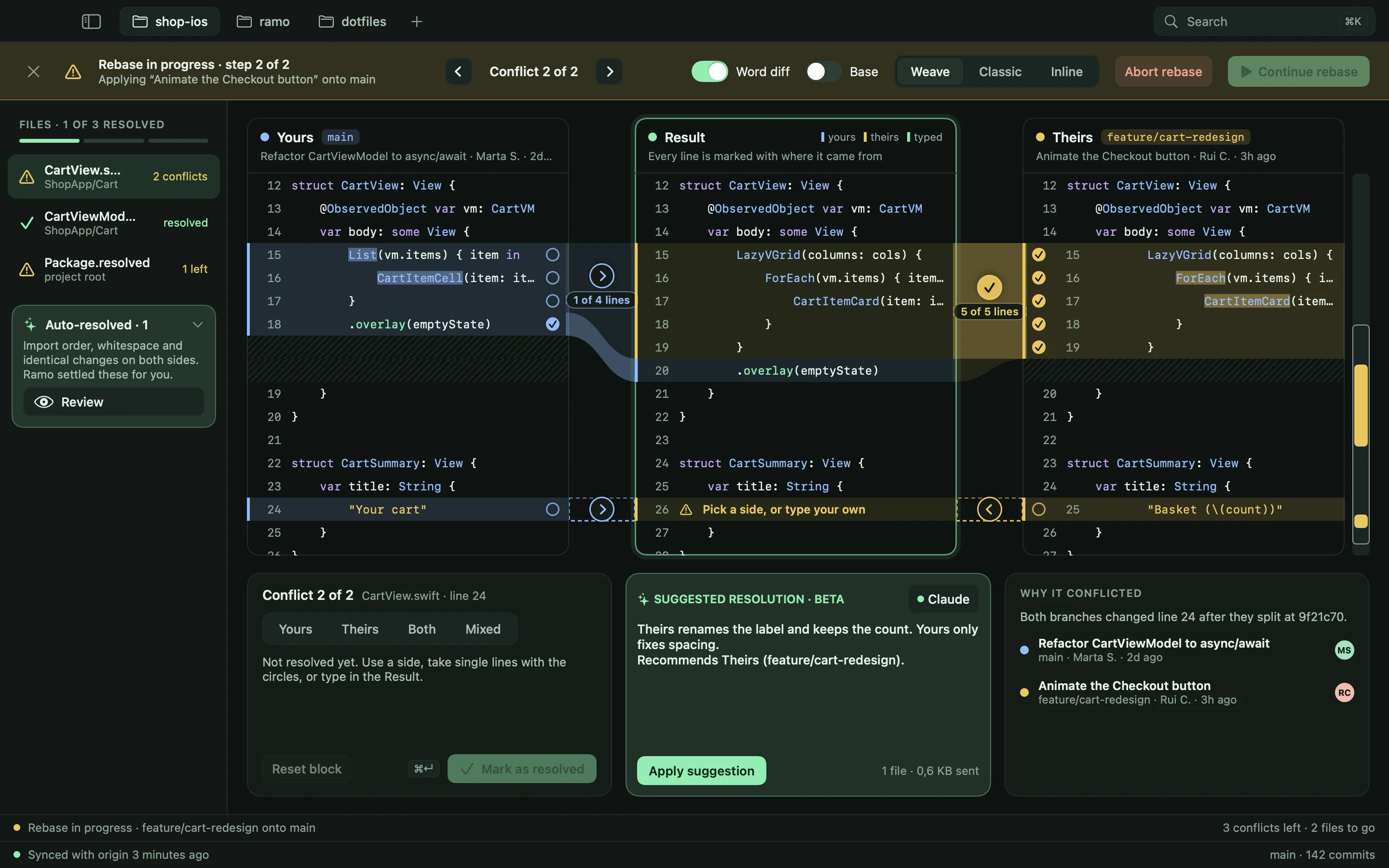
Yours, Result, Theirs
Three panes with ribbons that show where each line goes. Every line in the Result is marked by where it came from.
Edit by hand, anywhere
The Result is a real editor. Take a block, single lines, or type your own. Classic and Inline views share the same session.
Settles the boring parts
Import order, whitespace and identical changes are resolved for you, and you can review every one.
Knows why it conflicted
See which commits changed the same lines, and who made them, before you decide.
Image conflicts Conflitos de imagens
See the conflict. Then pick.
Images can’t be merged line by line, so you need to see them. Ramo shows both versions side by side, with swipe, fade and difference views, plus size, dimensions and how much changed.
- Side by side, swipe, fade or difference
- Dimensions, file size and pixels that differ
- Keep one, or keep both under different names
- Copied byte for byte, never re-encoded
Where Ramo goes further Mais longe
Three more things we sweated over.
Conflicts are only the start. These are the parts you will feel every day.
Safety net Desfazer
Undo that actually remembers.
Every operation that changes your repository goes on a timeline: commits, merges, rebases, pulls, stashes. Pick a point, preview exactly what comes back, restore it.
- Preview before you restore
- Rescues a bad rebase or a hard reset
- Recoverable for 30 days
Merge and rebase Arrastar
Drag a branch. See the result first.
Drop one branch on another and choose merge, squash or rebase. Ramo redraws the history for each option and runs a dry run, so you know about conflicts before a single file changes.
- Result preview that follows your cursor
- Conflict dry run, nothing touched
- ⌘Z takes it back
Assistant Assistente
AI that works with what you already pay for.
Ramo ships no model and runs no servers. Connect your own Claude, ChatGPT or Gemini command line tool, an API key or a local model for commit messages, explanations and pull request drafts.
- Optional, and off until you connect it
- You see what will be sent, and a never-send list keeps .env and keys out
- Straight from your Mac to your provider
Features Funcionalidades
Everything you expect, and a bit more.
Fast like a native app, deep where it counts, and a calmer window to work in.
A history you can read
A lane-colored graph, filters, and a commit detail with the diff beside it.
Line-level staging
Stage a hunk, or click single lines. The diff keeps its + and − signs, never color alone.
Stash in two clicks
Select one file or many in Changes, name the stash, and undo from the toast.
⌘K palette
Every action, branch and commit behind one shortcut.
Branch health
See what is merged, stale or only local, and clean up in batch with a safety net.
Interactive rebase
Reorder, squash and reword with a live result and an automatic backup.
Identity profiles
The right name, email and signing key per remote or folder, so work email stays at work.
Asks before it acts
Merge, Rebase, New branch and Sync show a preview and wait for your yes.
Light, dark, your color
Follows macOS. Six accents, and color-blind friendly diffs.
Your Git, your tools
Uses the Git on your Mac, so your hooks, SSH keys and credential helpers just work.
Any host
Works with any Git remote: GitHub, GitLab, Bitbucket or your own server. No account needed.
Native and quick
Built in Swift for the Mac. No Electron, no web view in sight.
Compare Comparação
Honest about where it matters.
A quick look at the things we built Ramo around, against the Git clients most Mac developers know.
| What you get | Ramo | Most Git clients |
|---|---|---|
| Undo timeline with a preview of what comes back | Yes | Rare |
| Merge and rebase preview, with a conflict dry run | Yes | Rare |
| Conflict editor with an editable result and word diff | Yes | Varies |
| Image conflicts: swipe, fade and difference | Yes | Rare |
| Stash chosen files straight from Changes | Yes | Sometimes |
| AI through your own assistant, asks before sending | Yes | Varies |
| Identity profiles by remote or folder | Yes | Rare |
| Branch cleanup with merged and stale context | Yes | Rare |
| Native Mac app | Yes | Varies |
Our own assessment of popular Mac Git clients, November 2026. Features change, so if something here is out of date, tell us and we will fix it.
- Undo timeline with previewRamoRare
- Merge preview and dry runRamoRare
- Image conflict compareRamoRare
- Identity profilesRamoRare
Rare means rare among popular Mac Git clients. Our own assessment, November 2026.
The name O nome
Ramo is the Portuguese word for branch.
ramo
- branch, of a tree.
- bouquet, a bunch of flowers.
- branch of a field or business.
Say it: RAH-moo, with a soft, nasal “a”.
A branch is where an idea grows.
In Git, a branch is how you try something without risking the rest: it grows away from the main line, safe to explore, and joins back when it is ready. That is the whole app in one word, and Portuguese already had it.
So the app carries a Portuguese name, and a little of the place it comes from. Ramo is also what you give someone when you want to say well done, which suits a merge that goes through on the first try.
- A commit
- Where a piece of work lands.
- A leaf
- Work that grows from the branch.
- A branch
- The line that splits off.
- A commit
- Where the idea started.
The symbol is the name, drawn.
Two commits, a line that splits, a leaf at the end of it. Drawn with one stroke weight and round caps, the way you would sketch a branch on paper.
The colors As cores
Why green, and why this green.
- Forest
Floresta
The canopy, and the quiet of an editor late at night. The base of every screen.
- Deep green
Verde-musgo
The shade under the branches. Used for depth, selection and calm.
- Mint
Menta
New growth, and the green of an added line in a diff. It marks what you can act on.
- Lime
Folha
The leaf. Used sparingly, for what is alive and new.
Pricing Preço
Try it for 14 days. Keep it for €24.
One price, one payment. Ramo is made for individual developers, so there are no seats, tiers or upsells.
- 1
Download
Get the app and drag it to Applications. No sign-up.
- 2
Try it for 14 days
Every feature, on your own repositories. The clock starts when you first open Ramo.
- 3
Keep it for €24
Like it? Buy a license once and it is yours. No subscription.
Ramo for Mac
14-day trial€24one-time payment
yours to keep
- Every feature from the first day
- No account to try it
- No subscription, ever
- Made for individual developers
- On up to 2 of your Macs
Requires macOS 15 or later. Price in euros, taxes may apply at checkout.
FAQ Perguntas frequentes
Good questions.
Why is it called Ramo?
Ramo is the Portuguese word for branch, which is what Git is built around. The colors come from the same place: forest, new growth and a leaf. The full story is on this page, under The name.
Is Ramo only for Mac?
Yes, on purpose. Ramo is a native Mac app and needs macOS 15 or later.
What happens after the 14 days?
Ramo stops changing your repositories until you add a license. Your repositories and history are never touched, and you can buy a license at any time.
Can I use my license on more than one Mac?
Yes, on up to 2 of your own Macs. To move it to another one, remove it from a Mac in Settings, under License.
Do I need an account?
Not to try it, and not to use it. Ramo works with your Git remotes as they are, with no hosting account to connect.
Does Ramo send my code anywhere?
No. Ramo runs Git on your Mac. Nothing leaves it unless you push, or use the optional AI features, which send only the diff you approve to the assistant you chose. Ramo has no crash reports or usage data at all.
Do I need an AI subscription?
No. AI is optional and off until you connect an assistant. Ramo ships no model of its own.
Ready to branch out?
Download Ramo, open a repository, and see how calm Git can feel. Fourteen days on us.
Descarregar para Mac